You pasted 40 pages—why does the answer feel shallow?
You paste a long report, a thread of emails, maybe a contract plus notes, and the reply still comes back like a generic executive summary. It hits the obvious points, skips the weird exceptions, and ignores the parts you cared about. That’s not usually because you “prompted wrong.” It’s because the model doesn’t read like a person reading to understand; it predicts what a plausible answer should look like from patterns in the text it can actively use.
Once the input gets long, the model has to compress. It can’t keep every detail equally available, so it leans on what repeats, what’s phrased clearly, and what looks like a main theme. Edge cases disappear, definitions drift, and small but critical numbers get replaced by “typical” ones. Getting depth requires shaping the job, not just pasting more text.
When the output looks confident but wrong, what’s actually happening?
You ask a focused question, get a crisp answer, and only later notice it cites a clause that isn’t there or merges two different events into one. The confidence is part of the format: the model is trained to produce fluent, complete-sounding text, even when the evidence in your paste is thin or scattered.
When key details are missing from what it can actively use, it fills the gaps with the most likely version of the story. If your materials include near-duplicates (two similar definitions, two timelines, two “final” drafts), it may blend them because the overlap looks like confirmation. Numbers are especially fragile: a single fee, date, or threshold can get swapped for a more “typical” one if the true value isn’t prominent in the working set.
The hidden bottleneck: how much the model can keep “in mind” at once
You’ll see it when you ask for “all the exceptions” or “every obligation by party,” and the answer quietly drops items that were clearly in the text. What’s happening is a working-set limit: only a slice of the conversation is fully available at any moment, even if you pasted far more. The rest isn’t “forgotten” like a human forgets; it’s just not in the active window the model is using to predict the next sentence.
Inside that window, attention gets uneven. Repeated phrases, headings, and cleanly stated claims pull focus, while footnotes, tables, and one-off carve-outs fade. If a definition appears on page 2 but the relevant clause is on page 37, the model may answer from the clause and approximate the definition. That’s when you get smooth text with subtle drift.
Expanding the window and asking for exhaustive coverage slows things down and can still miss low-salience details, which is why structure matters more than volume.
Complexity isn’t just length—it's goals, contradictions, and mixed source types
You see it when the packet isn’t just “long,” but messy: a contract, redlines, Slack quotes, and a slide with bullet points that don’t match the draft. If you ask for “the key takeaways,” the model has to pick what “key” means. If your goal is risk spotting but the text reads like a sales narrative, it will often mirror the dominant tone unless you force a different frame.
Contradictions make this worse. Two dates, two scopes, two definitions of the same term can look like harmless variation, so the answer merges them into one clean story. A common failure mode: it reports the later clause as the “final” rule, then quietly carries an earlier exception forward anyway.
Mixed source types add friction. Tables, footnotes, and tracked changes don’t behave like plain paragraphs, and details tucked there can vanish unless you isolate them and ask targeted questions.
So what do you do: chunk it, stage it, or add retrieval?
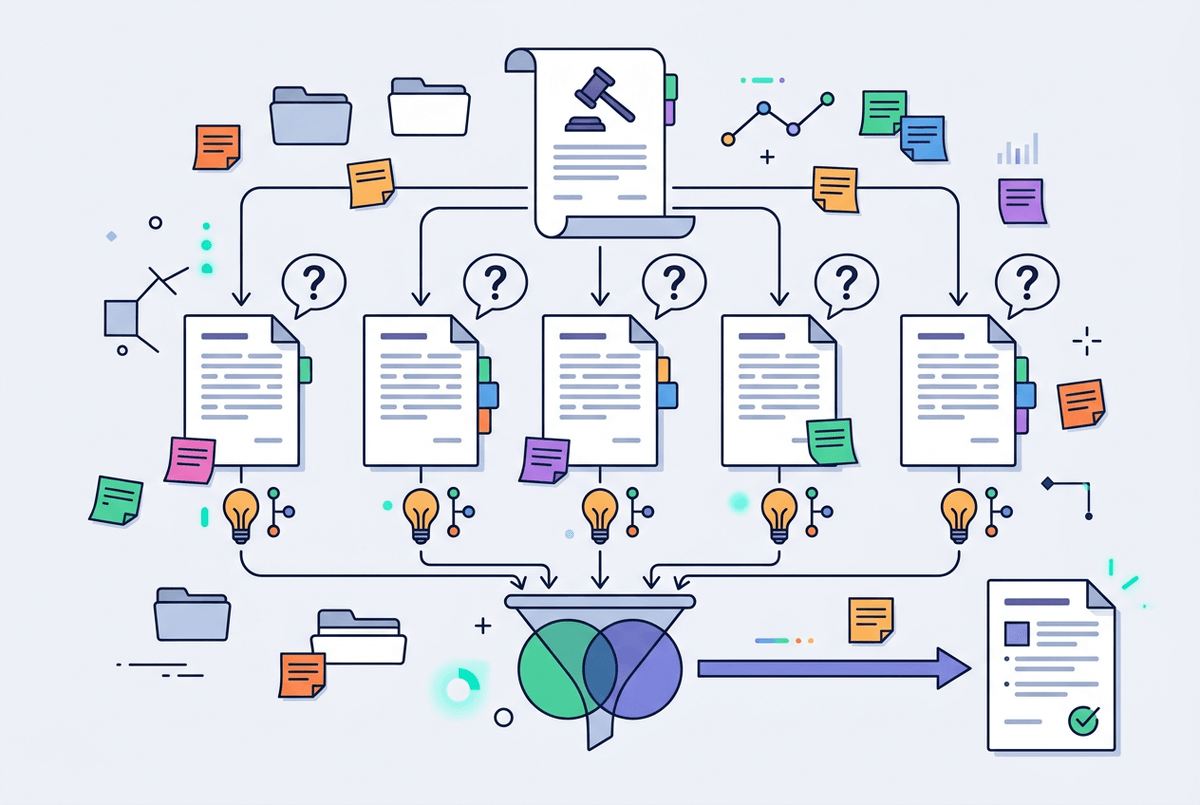
You’re usually staring at a practical choice: do you keep fighting for one “complete” answer, or do you break the job into smaller passes so nothing important gets crowded out. If the stakes are low and you mostly need themes, chunking works: split by natural boundaries (sections, parties, time periods), then ask the same question on each chunk and compile the results. The annoying part is overhead. You have to name chunks consistently, track what’s been covered, and reconcile duplicates yourself.
When you need reasoning across the whole set, staged work is steadier than a single shot. Start by forcing a structured inventory (“list every defined term,” “extract all dates and deadlines,” “capture exceptions verbatim with their section IDs”), then ask for conclusions that must cite that inventory. This reduces drift because the model reasons over a smaller, cleaner working set, but it costs extra turns and you may still miss a footnote unless you explicitly include it.
Retrieval helps when the corpus is too big to paste or you can’t predict which passages matter. Instead of “summarize,” ask questions that pull specific snippets (“show clauses governing termination for convenience”) and only then synthesize. That sets up the prompts that prevent coverage gaps.
Prompts that prevent coverage gaps without turning into a novel
You’ll feel the coverage gap when you ask for “everything relevant” and get a neat answer that somehow skips the one clause you’re worried about. The fix is to stop asking for completeness in one breath and start forcing a visible checklist. For example: “Create a table with (1) claim/obligation, (2) who it applies to, (3) trigger, (4) exceptions, (5) exact quote, (6) source location.” Then: “Only answer the question using rows from that table; if a row is missing, say ‘missing evidence’ and ask for the chunk that likely contains it.”
Use “must cite” constraints that are easy to audit: “Give 8 bullets; each bullet must include a section ID and a 10–20 word quote.” Add a “coverage probe” at the end: “List 5 plausible edge cases you did not see evidence for.” These prompts produce longer outputs and you’ll spend time cleaning tables and deduping near-identical clauses before you can use them.
Once the scaffolding is in place, you can tighten the ask without losing track of what got checked.
Before you trust it: lightweight verification for high-stakes work

You draft an email to a partner, a client, or a judge, and the model gives you a clean answer with citations that look reassuring. Don’t treat that as verification. Treat it as a shortlist of places to check. A fast pattern is: pick the 3–5 highest-impact claims (money, dates, must/shall, termination, liability) and require a quote plus a location for each. Then open those spots yourself and confirm the words match the conclusion.
When you can’t open the source, do the next best thing: ask for “two supporting quotes and one counter-quote.” If it can’t produce a counterexample, it may be smoothing over a carve-out. Also run a quick consistency scan: “list every number/date mentioned and where it came from.” This adds minutes, but it beats discovering a swapped threshold after you’ve sent the memo.
Once the critical claims survive that check, you can turn the rest into a longer-running conversation without losing your footing.
Turning long documents into reliable conversations
You’ll usually notice the conversation goes off the rails when you return a day later, ask a follow-up, and the model “remembers” a detail that was never actually confirmed. Treat long-document work like maintaining a case file: keep a running, editable fact sheet (definitions, parties, numbers, dates) and a separate list of open questions, and make the model update those artifacts instead of free-form chatting.
In practice, that means every turn ends with a small, testable output: “add any new obligations to the obligations table,” or “append only new exceptions with a quote and location.” If you skip the updates or let the tables bloat, you’re back to hand-wavy synthesis. When the artifacts stay tight, the next question can be sharper.