You gave the details—so why did the model answer a different question?
You paste a careful brief—three bullets of constraints, a couple of edge cases, maybe a “don’t do X”—and the response still drifts. It answers the question you didn’t ask, or it grabs a minor detail and treats it like the main point.
That usually isn’t “ignoring” you in the human sense. It’s a visibility problem: you can’t see which parts of your prompt stayed usable, which parts got blurred by the model’s compression, or which cues looked most “relevant” based on patterns it has seen before.
Once you know what “relevance” means to the model, you can make it predictable instead of hoping it behaves.
What the model is actually optimizing for when it picks “relevant” tokens

In a long prompt, the model tends to latch onto what looks like the “shape” of a familiar task: a question near the end, a bolded phrase, a list that resembles requirements. If your real constraint is buried mid-paragraph, it can lose the contest to easier signals—like “write a summary,” “keep it short,” or a repeated term that resembles the usual answer.
Under the hood, it isn’t searching for truth or even for your most important sentence. It’s picking the next token that best fits the patterns implied by the tokens it can still use. That means “relevant” often equals “predictive.” If the prompt includes both an example and a rule, the example can dominate because it offers concrete wording to copy, while the rule stays abstract.
This is why tiny prompt choices matter: a constraint stated once, softly, can get outweighed by louder structure. When you’re paying for speed, you also pay for ambiguity—so the next sections focus on the cues that win by accident.
When recent lines, repeated phrases, and formatting accidentally win
Those “accidental winners” are usually the things closest to where the model starts generating. If you end your prompt with “Give me three options” or a casual question, it can override a stricter instruction you wrote earlier like “use only the provided data.” In day-to-day use, this shows up when you paste a long doc, then add one last line—“can you make it punchier?”—and the output turns into a rewrite instead of an analysis.
Repetition also acts like a weight. If a stakeholder phrase shows up five times (“go-to-market”), the model may treat it as the objective, even if your real goal is “risk assessment.” Formatting can do the same. Headings, bullets, and bold text often become anchor points, so a neatly formatted example can steal attention from a plain-text constraint.
The fix isn’t to decorate your prompt. Put your non-negotiables in the last 3–6 lines, restate them once in a tight block, and avoid repeating the wrong frame in your own context. The hard part: it can feel awkward and redundant, but that’s often what keeps the right details from getting compressed away.
Spotting the moment it starts guessing instead of using your context
That awkward redundancy pays off because it gives you a clear signal when the model stops following your constraints and starts filling gaps. You’ll see it when the answer suddenly turns generic: it swaps your numbers for round ones, changes a defined term (“active users”) into a looser one (“customers”), or reverts to a familiar template even though you gave a specific structure.
Watch for “confident glue” sentences—claims that connect ideas smoothly without pointing back to anything you supplied. In a product brief, that looks like “users typically prefer simplicity” right after you stated your audience is compliance-driven. In a summary task, it shows up as new facts that weren’t in the pasted text, often paired with hedges like “generally,” “likely,” or “in many cases.” Those aren’t always wrong, but they’re a sign the model is leaning on patterns instead of your context.
The quickest test is to ask for receipts before you trust the output: “Quote the line(s) you used for each key claim,” or “List the constraints you’re applying, then answer.” The downside is speed—you’ll spend an extra turn and the response may get longer—but you’ll catch drift early, before it sneaks into a slide or an email.
Make relevance cheap: constraints that survive compression
That extra turn for “receipts” works best when you already gave the model something easy to carry forward. In practice, people do the opposite: they write a long, nuanced paragraph of requirements and hope the model keeps the intent. It won’t. Make the constraints cheap to remember by turning them into a small block the model can’t mistake for background.
Put a “Non‑negotiables” list at the end: 3–7 bullets, each one testable. “Use only the pasted data.” “If a claim isn’t supported, say ‘not in the source.’” “Output format: table with columns A/B/C.” Then add one negative example in plain words: “Do not add industry facts or typical benchmarks.” This survives compression because it’s short, concrete, and close to generation.
It can feel blunt and repetitive, and stakeholders may push back on the tone. If you need it softer, keep the wording polite but keep the structure rigid. When you can’t shrink the prompt, shrink the decision: ask for the constraints list first, then approve it before the draft.
If the prompt is long, change the workflow—not the wording
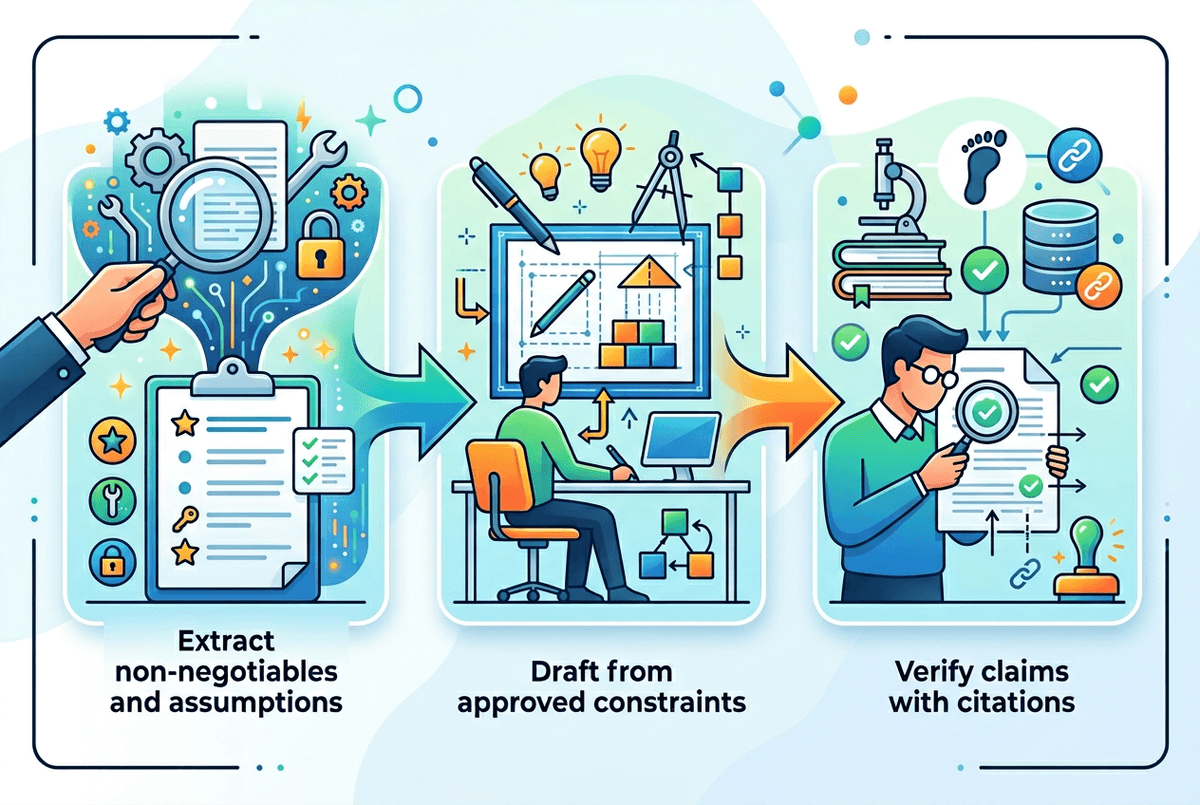
That “approve the constraints first” move becomes essential when the prompt is genuinely long—like a strategy doc plus meeting notes plus a data table. At that point, you can tweak wording all day and still get drift, because the model has to compress and prioritize, and your real requirements can lose out to whatever looks easiest to continue.
Change the workflow: split the job into passes. Pass 1: “Extract the non-negotiables and assumptions from this doc. Output as bullets. Don’t draft yet.” Pass 2: “Here are the approved constraints—now draft.” If you need fidelity, add a third pass: “For each claim, cite the exact line you used.” This costs time and tokens, and it can feel slow when you just want an email.
When the output still slips, treat it as a signal that the task needs smaller chunks or retrieval (paste only the needed excerpt, then ask). Before you run another long prompt, a quick pre-send check catches most failures.
A quick relevance checklist you can run before you hit send
That quick pre-send check is mostly about forcing your constraints to “win” in the final lines. Before you hit send, scan the last 6–10 lines: do they include a tight “Non-negotiables” block, the exact output format, and one clear “do not” (like “do not add outside facts”)? If not, the model will often follow the nearest easy cue instead.
Then run a two-question sanity test: “What are the constraints you will apply?” and “What sources are you allowed to use?” If the answers aren’t identical to your intent, fix the prompt, not the draft. An extra turn and a bit of repetition, but it’s cheaper than cleaning a confident, off-brief answer after it’s already in your doc.
Finally, look for drift traps you wrote yourself: repeated stakeholder phrases, a casual last-minute request (“make it punchier”), or an example that’s formatted better than your rules. Remove the trap, restate the rule once, and only then ask for the work.