When a chat that started simple starts to wander
A customer chat often starts clean: one issue, one goal, a quick answer. Then the user adds a small twist—“also,” “while I’m here,” “by the way”—and the conversation turns into a thread of related asks. That’s where many assistants begin to drift: they keep acting like the original problem is still the center, or they drop an earlier detail that still matters, like an order number or plan tier.
This is harder in production than in demos because real users rarely label topic switches, and your logs will show messy, mixed intents. If you want fewer surprises, you need a simple way to predict what the assistant treats as “still in scope” as the topic slides.
What the assistant is likely paying attention to (even if it never says so)
In a typical support chat, the user drops one new detail—an order number, a plan name, a date—and then asks something that sounds related. The assistant usually latches onto whatever looks most “actionable” right now: the latest question, the last constraint stated, and any identifiers it can reuse to sound consistent. If the user’s newest message contains strong cues (“refund,” “cancel,” “upgrade”), those words often outweigh older context that isn’t repeated.
It also tends to treat certain details as sticky defaults. If “premium plan” or “international shipping” showed up early, that assumption can silently carry forward even after the user pivots to a different product or account. That’s why you’ll see confident answers built on yesterday’s premise.
Small facts that aren’t referenced—like a coupon code mentioned once—can slip behind newer turns unless you bring them back into the user’s phrasing.
You changed the subject a little—why did it keep the old assumptions?
You’ll see this when a user makes a “small” pivot that still shares vocabulary. They start with “upgrade my plan,” then ask, “Also, can I change the billing email?” Because both sound like account work, the assistant often keeps the earlier frame—same plan, same region, same account—unless the user explicitly breaks it. If the chat already anchored on “Premium” or “international,” that label can keep getting reused even when the user’s real intent has shifted to a different product line or a different subscription.
It’s not stubbornness; it’s pattern matching under time pressure. The assistant tries to stay coherent, and the cheapest way is to reuse prior assumptions instead of asking, “Are we still talking about the same account?” That saves a turn, but it can quietly stack errors. The risk goes up when users say “my other account,” “another order,” or “actually,” without giving a fresh identifier.
When you notice this, the fastest fix is to force a clean anchor: restate the new target (order number, account email, product) before the next question lands.
The ‘forgetting’ wasn’t random: spotting the moment context got crowded

In long support threads, the assistant rarely “forgets” at the same time users feel the chat is still on one track. It happens right after a burst of new inputs: a copied error message, a policy excerpt, three quick questions in one send, or a back-and-forth where both sides introduce new nouns each turn. If the user then asks something short—“Can you do that for me?”—the assistant may grab the newest concrete detail and drop the older one that actually makes the request possible, like the exact order ID.
You can spot the crowding moment in logs when references stop repeating. The user mentioned “Order 91352” once, then the conversation shifted into “refund window,” “chargeback,” “billing address,” and “shipping delay.” When the order number doesn’t show up again for several turns, it’s a prime candidate to fall out of the active set, even if it still matters to the outcome.
Should you force a reset, ask a clarifier, or let it ride?
In real chats, you’ll often feel the assistant wobble: it answers quickly, but you can tell it’s using the last “sticky” assumption (same account, same order, same plan) while the user is drifting somewhere else. If the next action depends on a specific target—an order ID, account email, device model—don’t let it ride. Force a reset with a one-line anchor like “New topic: billing email for Account B ([email protected]).” You’re buying accuracy with one extra turn.
If the user’s intent is still plausible but the target is ambiguous (“my other order,” “that subscription”), ask a clarifier instead of resetting the whole thread. Make it a forced choice: “Do you mean Order 91352 or the March order?” That keeps momentum and prevents a confident wrong answer.
Let it ride only when the impact is low—policy explanations, general how-to steps, or anything the user can verify before acting—then tighten the anchor before you take an irreversible step.
Designing conversations so small pivots don’t become big failures
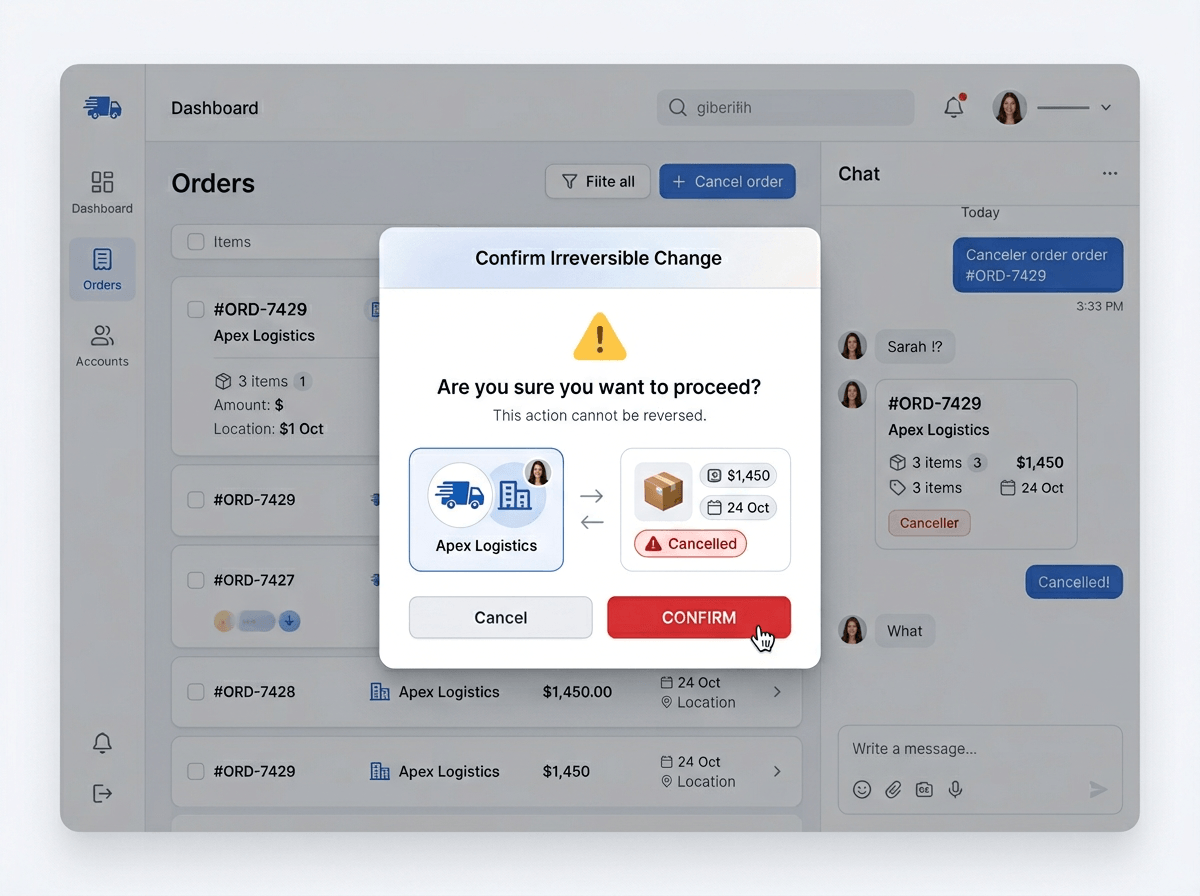
In most deployments, the drift shows up right where users feel they’re being efficient: they stack two small asks into one message, or they return after a brief tangent and assume the assistant kept the same target. If you want the chat to survive that pattern, build in tiny “anchors” that reappear naturally—an order ID badge in the UI, a short “Working on: Order 91352” line in the assistant’s replies, or a templated question that repeats the active account once per turn when actions are about to happen.
When you detect a pivot, make the model earn the carryover. A lightweight rule works: if the user introduces a new noun (“another account,” “different device,” “new address”), respond with a two-line recap plus one clarifier: “Got it. We’re switching to billing email—same account as before?” Avoid open-ended questions; forced choices reduce wandering.
Recaps add tokens, clarifiers add turns, and both can annoy power users. That’s why you reserve them for moments where the next step changes something irreversible, and keep everything else brisk.
A lightweight playbook your team can actually run during QA and launches
During QA, drift usually shows up when testers “help” by packing context into one long message, then switching targets in a short follow-up like “Can you change it?” Treat that as a scripted breakpoint: the playbook should force a visible target before any action.
Run three checks on every high-impact flow (refunds, cancellations, address changes): (1) a two-topic combo message, (2) “other account/order” with no new identifier, (3) a long paste (policy/error) followed by a pronoun-only ask. If the assistant answers without restating the active order/account, mark it. Fix with one templated recap line, plus a forced-choice clarifier. Budget for added turns; measure drop-off.